---
title: How to edit pass visibility in the Client Panel and Mobile App?
description: After adding passes or memberships to the system, you can always manage their visibility, that is control where they will be displayed (for example, in the Customer Panel, in the mobile application, or in both).
---
[Skip to content](https://supporthub.gymmanager.io/en-us/how-to-edit-pass-visibility#main-content)
- [English - United States](https://supporthub.gymmanager.io/en-us/how-to-edit-pass-visibility)
- [Polski](https://supporthub.gymmanager.io/pl/how-to-edit-pass-visibility)
English - United States
Show submenu for translations
[Customer portal](https://supporthub.gymmanager.io/portal?hsLang=en-us)
Open main navigation
Close main navigation
- - [English - United States](https://supporthub.gymmanager.io/en-us/how-to-edit-pass-visibility)
- [Polski](https://supporthub.gymmanager.io/pl/how-to-edit-pass-visibility)
English - United States
Show submenu for translations
- [Customer portal](https://supporthub.gymmanager.io/portal)
How can we help you today?
- There are no suggestions because the search field is empty.
1. [Knowledge base](https://supporthub.gymmanager.io/en-us?hsLang=en-us)
2. [Client Panel](https://supporthub.gymmanager.io/en-us/client-panel?hsLang=en-us)
# How to edit pass visibility in the Client Panel and Mobile App?
## After adding passes or memberships to the system, you can always manage their visibility, that is control where they will be displayed (for example, in the Customer Panel, in the mobile application, or in both).
**Step 1**. After logging in to the POS open "**Administration**" tab, select "**Offer**" from the top menu, then choose "**Passes**".
**Step 2**. In the configuration window, select the passes you want to edit and click the pencil icon.
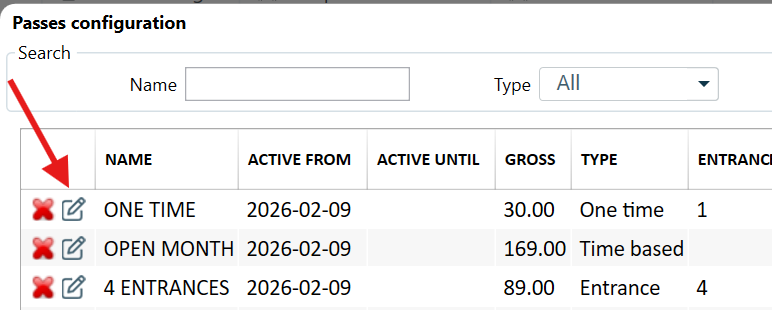
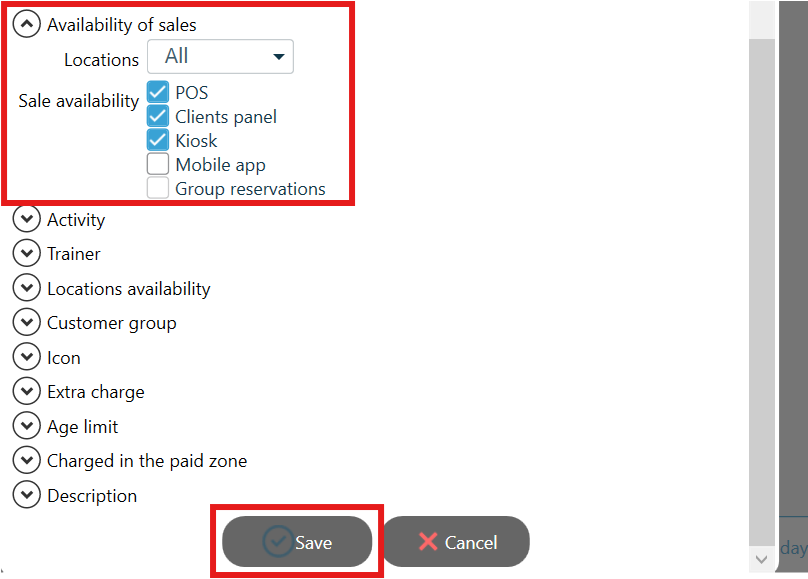
**Step 3**. In the following window, go to the "**Availability of Sales**" tab.
Set where the pass should be visible (e.g., in POS, in the Client Panel, Mobile App etc.) and click "**Save**".
- [Getting started](https://supporthub.gymmanager.io/en-us/getting-started?hsLang=en-us)
- [FAQ](https://supporthub.gymmanager.io/en-us/faq?hsLang=en-us)
- [Client Panel](https://supporthub.gymmanager.io/en-us/client-panel?hsLang=en-us)
- [Manager Panel](https://supporthub.gymmanager.io/en-us/manager-panel?hsLang=en-us)
- [Reception POS application](https://supporthub.gymmanager.io/en-us/reception-pos-application?hsLang=en-us)
[](https://supporthub.gymmanager.io/?hsLang=en-us)
[mailto:email@email.com](mailto:email@email.com)
Copyright © 2025, GYMMANAGER