---
title: How to enable or disable QR code access for clients in the Customer Panel and mobile app? How do clients use a QR code to enter the club?
description: Learn how to enable or disable QR code access for clients in the Customer Panel and the mobile app, and how clients use the QR code when entering the club.
---
[Skip to content](https://supporthub.gymmanager.io/en-us/how-to-enable-or-disable-qr-code-access-for-clients-in-the-customer-panel-and-mobile-app-how-do-clients-use-a-qr-code-to-enter-the-club#main-content)
- [English - United States](https://supporthub.gymmanager.io/en-us/how-to-enable-or-disable-qr-code-access-for-clients-in-the-customer-panel-and-mobile-app-how-do-clients-use-a-qr-code-to-enter-the-club)
- [Polski](https://supporthub.gymmanager.io/pl/how-to-enable-or-disable-qr-code-access-for-clients-in-the-customer-panel-and-mobile-app-how-do-clients-use-a-qr-code-to-enter-the-club)
English - United States
Show submenu for translations
[Customer portal](https://supporthub.gymmanager.io/portal?hsLang=en-us)
Open main navigation
Close main navigation
- - [English - United States](https://supporthub.gymmanager.io/en-us/how-to-enable-or-disable-qr-code-access-for-clients-in-the-customer-panel-and-mobile-app-how-do-clients-use-a-qr-code-to-enter-the-club)
- [Polski](https://supporthub.gymmanager.io/pl/how-to-enable-or-disable-qr-code-access-for-clients-in-the-customer-panel-and-mobile-app-how-do-clients-use-a-qr-code-to-enter-the-club)
English - United States
Show submenu for translations
- [Customer portal](https://supporthub.gymmanager.io/portal)
How can we help you today?
- There are no suggestions because the search field is empty.
1. [Knowledge base](https://supporthub.gymmanager.io/en-us?hsLang=en-us)
2. [Getting started](https://supporthub.gymmanager.io/en-us/getting-started?hsLang=en-us)
# How to enable or disable QR code access for clients in the Customer Panel and mobile app? How do clients use a QR code to enter the club?
To use QR code functionality, your club needs hardware that works with the system and can scan QR codes. You can use a standard scanner at the reception desk. You can install QR code readers at entrances, such as doors, gates, or turnstiles.
**1) How to enable/disable QR code access from the Manager’s Panel**
In the Manager’s Panel, go to: "**Administration"**- "**Settings**" - "**System"** and in the "**General"** section, scroll down to find the section related to QR code configuration.
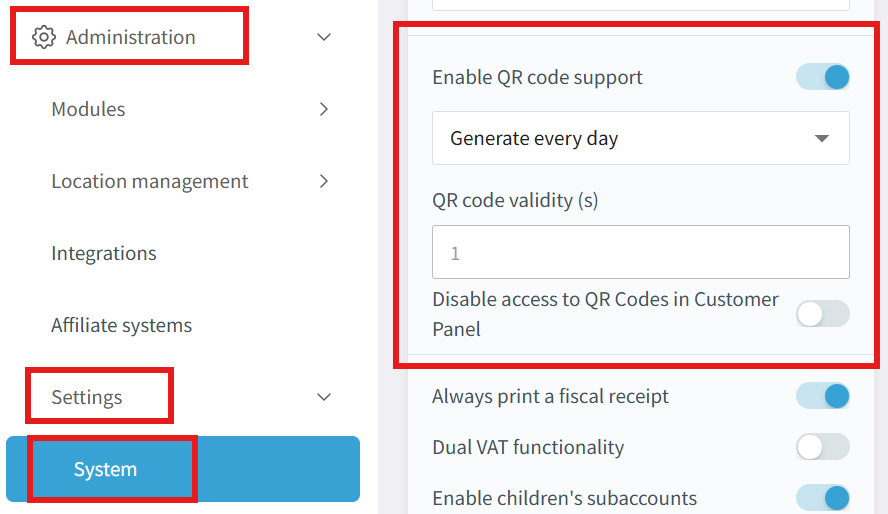
If you enable **"Enable QR code support",** you can generate QR codes in the Customer Panel and the mobile app.
If the club wants to block QR code generation in the Customer Panel and allow it **only** in the mobile app, enable the option **"Disable access to QR codes in Customer Panel"**.
---
**2)** **How to enable/disable QR code access from the POS application**
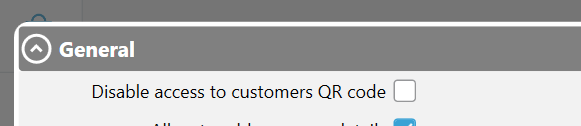
In the POS application, go to "**Administration"** - **"Modules"** - **"Reservations online".** Use the option **"Disable access to customers QR code".**
If this setting is enabled, clients will not be able to generate a QR code.
****
---
**3) How does a client use the QR code to enter the club?**
Once configured correctly, the QR code is available to every client:
\- in the Customer Panel under the "Your QR Code" tab
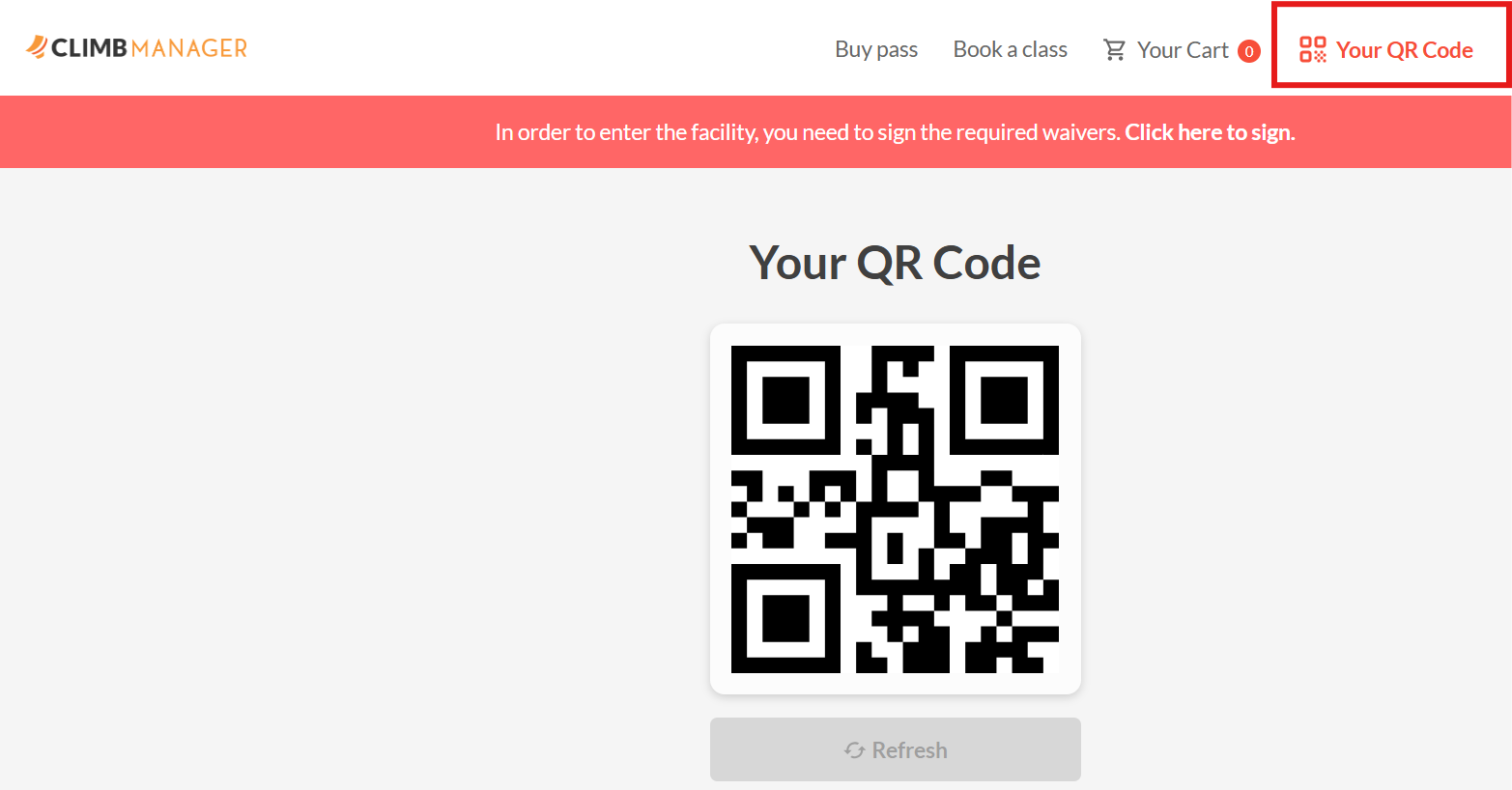
\- in the club’s mobile app.
**Step 1.** A client logs in to the Customer Panel or the mobile app and opens the "**Your QR Code"** tab.
**Step 2.** The client holds their phone or tablet with the displayed QR code close to the reader/scanner. After the QR code is scanned successfully, the client is automatically granted access to the club.
- [Getting started](https://supporthub.gymmanager.io/en-us/getting-started?hsLang=en-us)
- [FAQ](https://supporthub.gymmanager.io/en-us/faq?hsLang=en-us)
- [Client Panel](https://supporthub.gymmanager.io/en-us/client-panel?hsLang=en-us)
- [Manager Panel](https://supporthub.gymmanager.io/en-us/manager-panel?hsLang=en-us)
- [Reception POS application](https://supporthub.gymmanager.io/en-us/reception-pos-application?hsLang=en-us)
[](https://supporthub.gymmanager.io/?hsLang=en-us)
[mailto:email@email.com](mailto:email@email.com)
Copyright © 2025, GYMMANAGER