---
title: How to Log In to the System for the First Time?
description: Employee account activation and first login to the Manager’s panel.
---
[Skip to content](https://supporthub.gymmanager.io/en-us/how-to-log-in-to-the-system-for-the-first-time#main-content)
- [English - United States](https://supporthub.gymmanager.io/en-us/how-to-log-in-to-the-system-for-the-first-time)
- [Polski](https://supporthub.gymmanager.io/pl/how-to-log-in-to-the-system-for-the-first-time)
English - United States
Show submenu for translations
[Customer portal](https://supporthub.gymmanager.io/portal?hsLang=en-us)
Open main navigation
Close main navigation
- - [English - United States](https://supporthub.gymmanager.io/en-us/how-to-log-in-to-the-system-for-the-first-time)
- [Polski](https://supporthub.gymmanager.io/pl/how-to-log-in-to-the-system-for-the-first-time)
English - United States
Show submenu for translations
- [Customer portal](https://supporthub.gymmanager.io/portal)
How can we help you today?
- There are no suggestions because the search field is empty.
1. [Knowledge base](https://supporthub.gymmanager.io/en-us?hsLang=en-us)
2. [Getting started](https://supporthub.gymmanager.io/en-us/getting-started?hsLang=en-us)
# How to Log In to the System for the First Time?
## Step-by-step instructions for employees: account activation and first login to the Manager’s panel.
Employee accounts can be created during the system implementation based on the information provided in the installation form or added later directly in the system by a manager with the appropriate permissions.
**Step 1.** Once your account is created, you will receive an email containing: an activation link ("**Activate Account"**), your login details (username and password), a link to the Client's Panel, a link to a training video
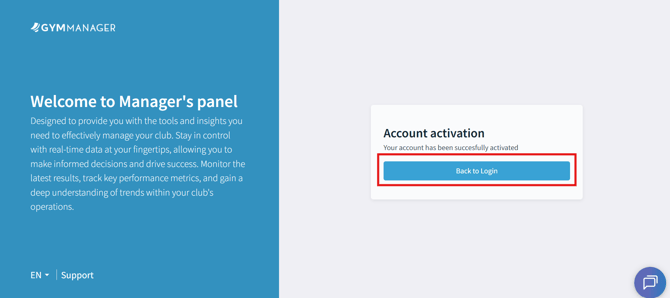
**Step 2.** Click the "**Activate Account**" button in the email. You will be redirected to the account activation page. After completing the activation process, click the "**Back to Login**"button.
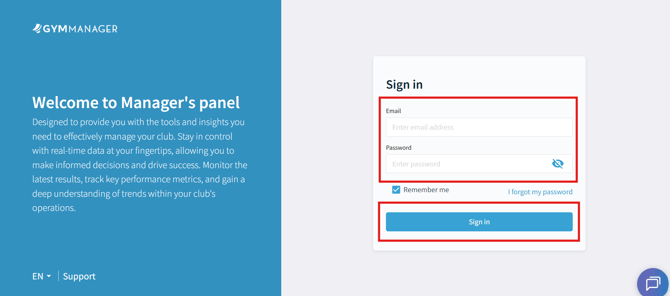
**Step 3.** On the login page, enter the login details you received in the email: your username and password. Optionally, you can check "**Remember Me"** to save your login information. Then click "**Sign In**"**.**
****
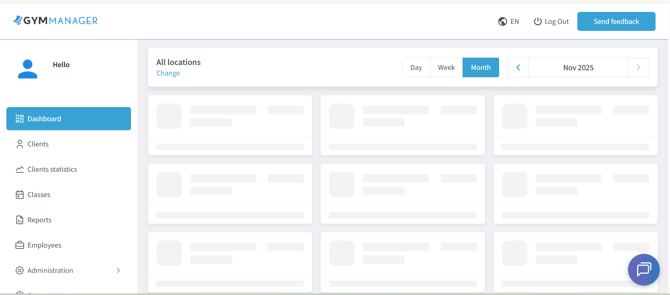
**Step 4.** After logging in, you will be redirected to the Manager’s Panel.
- [Getting started](https://supporthub.gymmanager.io/en-us/getting-started?hsLang=en-us)
- [FAQ](https://supporthub.gymmanager.io/en-us/faq?hsLang=en-us)
- [Client Panel](https://supporthub.gymmanager.io/en-us/client-panel?hsLang=en-us)
- [Manager Panel](https://supporthub.gymmanager.io/en-us/manager-panel?hsLang=en-us)
- [Reception POS application](https://supporthub.gymmanager.io/en-us/reception-pos-application?hsLang=en-us)
[](https://supporthub.gymmanager.io/?hsLang=en-us)
[mailto:email@email.com](mailto:email@email.com)
Copyright © 2025, GYMMANAGER